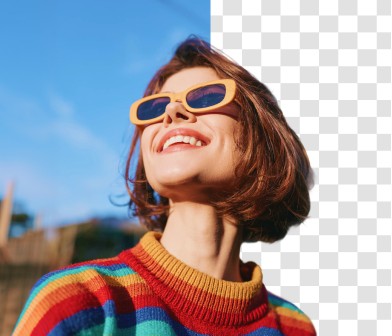
Free AI background remover
Remove, replace, or change your image background with AI in seconds. Easily remove bg from photos and create polished cutouts.
Terms of Service
and have read ourPrivacy Policy
.Please ensure you have the rights to all aspects of the image, and comply with our
Copyright Policy
andCommunity Guidelines
.Powering great writing for millions worldwide

What is a background remover?
An AI background remover automatically detects and erases the background from any photo, leaving just the foreground or subject on a transparent canvas. Remove backgrounds to create isolated subjects that you can then place in updated images.
Quillbot's free AI background remover isolates subjects, even those with complex features like hair, fur, or shadows. With our photo background remover, you can remove backgrounds from JPGs, PNGs, or WebP files and download clean JPEG, PNG, GIF, PDF, and PPTX files in seconds, no sign-up needed. That means you can remove backgrounds to clean up headshots, create product photos, or draft social media posts in seconds. Simply upload the source image to the free background remover and get a crisp PNG.
How to remove image backgrounds with Quillbot
Upload your image: Drag and drop a JPG, PNG, or WebP file onto the page, or click to browse your device and select one manually. As a background remover online, there's nothing to install first. The upload happens right in the browser, on any device.
AI removes the background: Quillbot's background eraser gets to work the second the upload finishes: it scans the image for where the subject actually is, then traces the edges pixel by pixel, even where they get complicated—hair, fine mesh, blurred shadows. As an image background remover, it doesn’t need a box drawn around the subject or edges brushed over by hand; the AI decides what stays and what goes on its own. The whole thing runs in a few seconds, no matter how detailed the edges are.
Add new background: Use Quillbot's AI background generator to place your image in a new setting. Transform the scene in seconds without having to recreate the entire image.
Share, export, or download: Once your background is removed, share your design or download the finished image. Choose your preferred file format, adjust the image size, and customize export settings such as transparency or compression before downloading.
What makes Quillbot’s AI background remover different?
Our AI detects every edge, shadow, and strand of hair, delivering clean, precise cutouts in seconds. No manual editing. No design skills. Completely free.
AI-powered precision
Fine edges are where background erasers usually fail. Hair strands, mesh fabric, shadows, and glass can all cause problems. Quillbot's AI reads all of that before evaluating what's subject and what's background, then hands back a clean, natural cutout in one pass. No manual masking, no brush tool, no zooming in to fix a stray pixel of hair.
Fast and free
Quillbot's free background remover handles full-resolution images in seconds—no software to install, no account to create first, just remove the background and download. Your transparent PNG that comes back carries no watermark, no matter how many times you use it. Upload once or 50 times; the process stays just as fast, with the same clean result every time.
Privacy-first
Every image you upload gets processed and deleted automatically. Quillbot doesn’t store your photos or use them to train AI. No account or sign-up means no profile tied to what you upload. Whether it's a personal photo, a client headshot, or an unreleased product image, your files stay private from upload to download, with nothing left behind. Plus, our privacy standards are built in automatically, so there’s nothing you need to configure.
Multi-format support
Quillbot's photo background remover works with JPG, PNG, or WEBP files directly. Once your background is removed, you can continue editing or export the finished design in your preferred format. Adjust the image size and export settings, including transparency and compression, before downloading the finished image.
Works anywhere
Quillbot's background remover works seamlessly on your desktop, phone, or any device with a browser. Remove a background at your desk before a meeting or from your phone while you're on the go. Nothing to download means no updates to manage and no app version to keep up with.
Who uses Quillbot's free AI background remover?
E-commerce sellers and marketers
Create images that meet Amazon, Etsy, and Shopify listing standards.
Designers and photographers
Refine and retouch backgrounds in portraits, mock-ups, and creative projects.
Content creators and social media managers
Design scroll-stopping posts, thumbnails, and reels with consistent branding.
Professionals and students
Produce polished profile photos, headshots, and presentation visuals in minutes, without needing Photoshop.
Tips for better background removal results
Use a high-quality image: Clear, well-lit photos give the background eraser more detail to work with.
Choose a clear subject: The more a foreground stands out, the better its cutout will appear.
Avoid cluttered photos: Images with busy backgrounds can make edge detection less precise.
Check the cutout before downloading: Make sure all edges and fine details are up to standards before downloading.
Export in the right file format: PNG keeps the canvas transparent. Use JPG only for solid backgrounds.
Experiment with Quillbot's background changer: Try placing your subject on a new background with a solid color, a different pattern, or a new scene entirely to make the subject stand out.
Try it multiple times: If results don’t turn out exactly how you pictured them the first time, give it another go for free.
Why writers love us
Quillbot’s background remover FAQs
How does Quillbot’s background remover work?
Quillbot’s AI background remover instantly identifies your subject and removes the background in one click. Simply upload your image, let our AI detect the edges and details, and download a transparent PNG in seconds. You can even change the background using our background changer, AI-generated scenes, solid colors, or gallery image, all online.
Is Quillbot’s background remover tool free to use?
Yes. Quillbot’s remove BG tool is free to use online. With the free plan, you can remove up to 5 backgrounds each day. Premium users get unlimited background removals, HD-quality transparent downloads, and faster AI processing.
What image file formats can I upload to Quillbot’s background remover?
Quillbot's BG remover tool supports all major image formats, including JPEG, PNG, and WEBP. Simply upload the file from your device, and the background remover will handle the rest.
Will the quality of my image be reduced after removing or changing the background?
No. Our AI background remover is designed to maintain full image quality. Your final download will retain crisp edges and natural lighting. You’ll get print-ready, high-resolution PNGs that are perfect for design, ecommerce, and personal use.
What is the maximum file size I can upload for background removal?
You can upload images up to 10MB for background removal. Keeping the file within this limit ensures faster upload, smoother AI processing, and high-quality output.
Why would I want to change the background of a photo?
A photo background changer turns a casual shot into one you can actually use elsewhere. A cluttered background may limit a photo to personal use, but replacing it with a clean white background using Quillbot’s photo background changer
Can I replace the background after removing it?
Yes. You can replace the background again right after removing it. Quillbot gives you theree ways to do this. apply a solid color with the background color changer, add a new photo or scene with the photo background changer, or describe the scene you want and generate it with the AI background generator. All three options are free, so you can remove and replace backgrounds seamlessly without leaving the page.
Does Quillbot's background remover work on mobile?
Yes. Quillbot’s online background remover works directly in your browser on any device. Simply open the tool, upload your photo, remove the background, and download the finished image.
Can I download my image in high resolution?
Yes, though it depends on your plan. Free downloads come out at standard resolution. Upgrade to Premium for full-resolution BG remover output. That means images sharp enough for print, large-format design, or e-commerce listings where someone might zoom in on the product. You can also use our HD photo converter image upscaler
Does Quillbot's background remover work for product photos?
Yes, product photography is one of the most common uses of a background remover for products. Upload a photo and Quillbot’s AI removes the background in seconds, leaving a clean cutout ready for a white background, marketplace listing, or custom scene. It works across clothing, accessories, food, gadgets, and furniture, including images with fine details such as fabric weave and stray threads. For e-commerce sellers, it can handle an entire catalog of product images, not just a single hero shot.
Does Quillbot have a video background remover?
Not yet. Quillbot’s background remover works on still images only (JPG, PNG, or WebP), video background removal isn’t supported at this time.