AI Voice Generator | How to Create Natural-Sounding Voiceovers
Creating high-quality voiceovers used to involve professional actors, expensive recording tools, or special skills. Today, an AI voice generator makes it easy to turn text into natural-sounding audio files in just a few clicks.
This means that voiceover technology is no longer limited to professional media teams. Teachers can quickly create audio lessons or reading supports, small businesses can create multimedia training and marketing materials, and everyday users can make customized narrations for personal projects.
Tools like QuillBot’s free AI voice generator let you choose from a variety of voices and tones to create customized MP3s for a variety of purposes.
This guide covers the benefits of using an AI voice generator and explains how anyone can create clear, high-quality MP3s.
Why use an AI voice generator for everyday audio needs?
An AI voice generator removes the barriers that used to prevent everyday people from making high-quality audio content. Instead of recording, editing, and troubleshooting audio files, you can simply enter your text and generate natural-sounding speech. Common reasons to use AI voice generators include:
- Create audio without recording your own voice: No microphone, quiet room, or audio editing skills are required. This is especially helpful for users who are short on time or working on a budget.
- Support learning and accessibility: Educators, trainers, and organizations can quickly create audio versions of instructions, reading passages, and other texts for learners who need information in an audio rather than a text format.
- Save time on updates and revisions: If your text changes (e.g., you update an employee handbook), you can regenerate the audio instead of re-recording everything from scratch.
- Produce consistent, high-quality audio: AI voice generators deliver clear, evenly-paced audio that’s free of human error. No need to worry about disruptions or background noises that can interfere with a live recording.
How to use an AI voice generator
With QuillBot’s AI voice generator, you can quickly turn text into a ready-to-use audio file. The process only involves a few simple steps.
Type your prompt
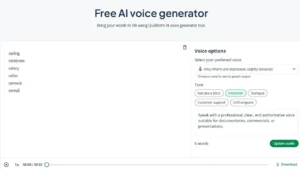
To get started, type or copy/paste the text you want to convert in the prompt panel. You can input vocabulary lists, reading passages, instructions, and more. The example below includes a classroom vocabulary list.
QuillBot’s voice generator landing page
Select your preferred voice and tone
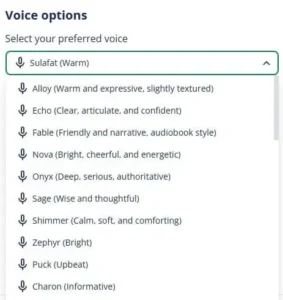
On the right side of QuillBot’s voice generator page, use the drop-down menu to choose the voice you want to use. There are over 30 voices to choose from. Below the drop-down menu, select your desired tone: “Narrate a story,” “Voiceover,” “Dialogue,” “Customer support,” or “Drill sergeant.” When you’re finished choosing a voice and tone, select “Update audio.”
Voice options from QuillBot’s AI voice generator
Review the output and download the audio file
On the bottom of the screen, press the play button to review the audio file. If you’re happy with the result, select “Download” to save the MP3 to your device. You can also experiment with other voices and tones until you’re completely happy with the output.
Frequently asked questions about AI voice generators
- What do text-to-speech tools do?
-
Text-to-speech tools like QuillBot’s free text to speech converter take written words and turn them into lifelike speech.
Simply type or paste your text into the tool and select a voice and tone. The tool will then generate an MP3 audio file that contains the “speechified” version of your text.
- What is an AI voice generator and how does it work?
-
An AI voice generator is a tool that uses artificial intelligence and text-to-speech technology to convert written text into spoken audio. Instead of recording your own voice, you simply input your text, and the tool synthesizes natural-sounding speech that you can download as an audio file.
QuillBot’s AI voice generator makes it easy for everyday users, like teachers and trainers, to create audio without special skills or equipment.
Cite this QuillBot article
We encourage the use of reliable sources in all types of writing. You can copy and paste the citation or click the "Cite this article" button to automatically add it to our free Citation Generator.
QuillBot. (2026, February 02). AI Voice Generator | How to Create Natural-Sounding Voiceovers. Quillbot. Retrieved February 12, 2026, from https://quillbot.visionseotools.cloud/blog/quillbot-tools/how-to-use-an-ai-voice-generator/